Docs / Features / Projects
// FEATURES
Projects
One inbox for your coding agents across computers, with Allow and Deny, git and live load.
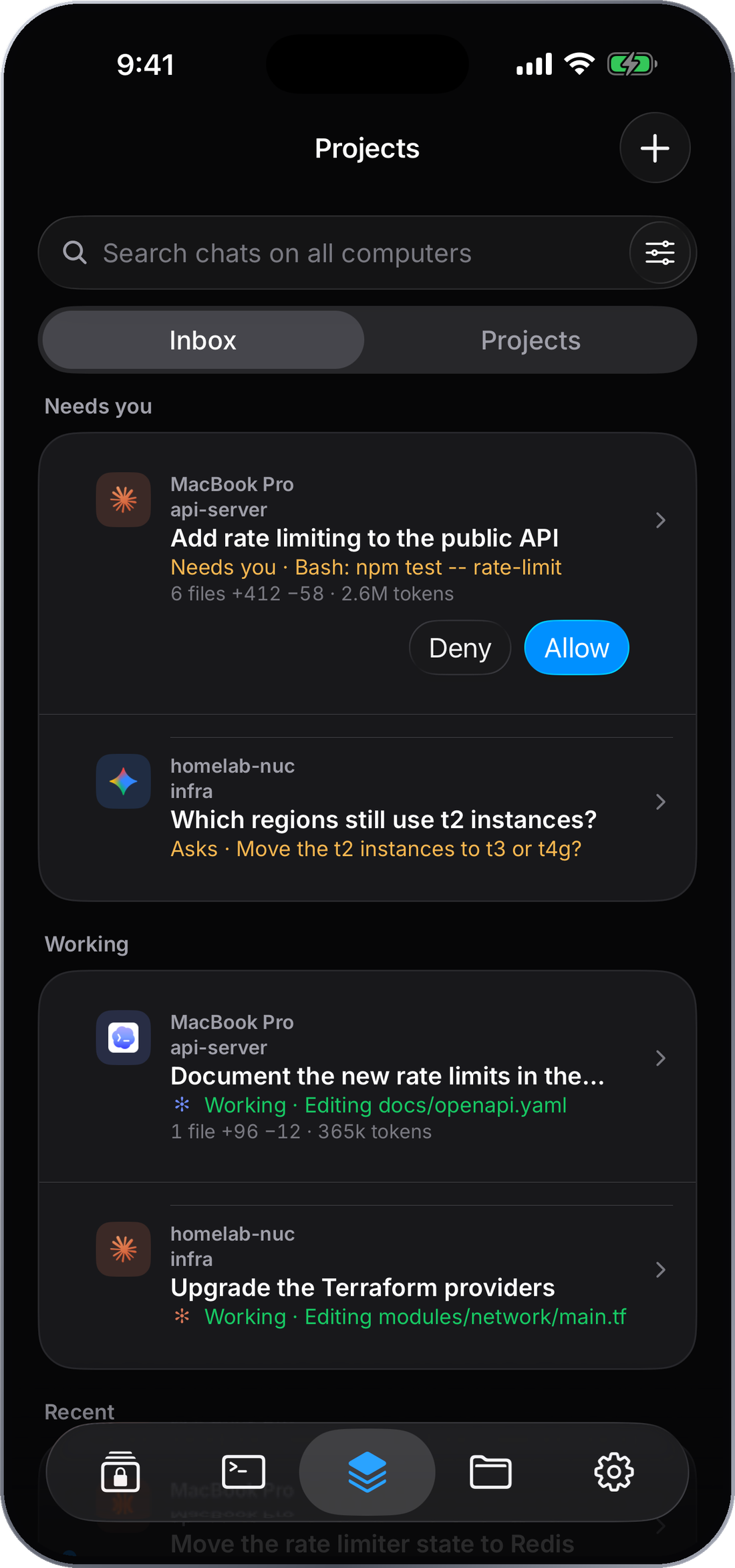
Every agent, one inbox
See which coding agents on which computers need you, and answer them from the card.
What it does
Projects shows every coding agent running on your computers in one place. A request to run a command shows up in the Inbox with Allow and Deny on the card; open a project to read the conversation, check git, start a new session, or see its services. Each computer shows its CPU, memory and load, live.
The CyberTerm helper
Projects runs on a small free helper on your Mac, Linux or Windows computer. It starts your agents and dev servers there and brings their requests to your phone. Open a computer in the app and choose Set up CyberTerm, and the app installs it over SSH. You can also install it with Homebrew or the install script. Updates work the same way, from the app.
Try the demo
Projects is part of Pro. The Projects tab has a Try the demo switch that fills it with sample projects and computers, so you can see how it works first. Nothing in the demo connects to your computers.
How it connects
The app talks to the helper over your own SSH connection, and only while the app is open. Requests wait on the computer until you answer. Alerts when the app is closed aren't available yet.